
Under 'Cost Models', you can find 'Freight Lanes'.
Here, you can find your saved freight lanes. You can create a new freight lane by clicking on '+ Add new freight lane'.
At the top, you can select the mode of transport.
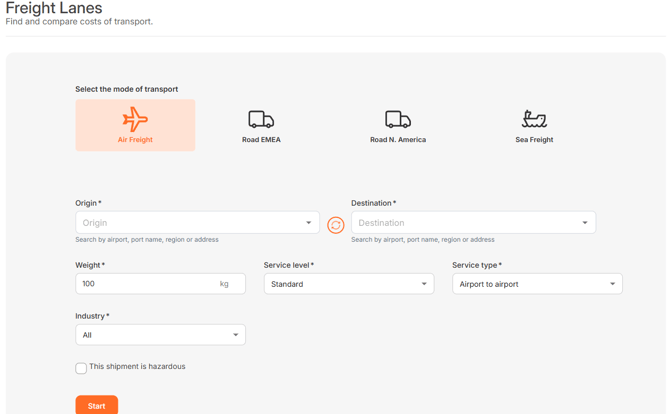
Then you can enter the place of origin and destination. You are able to select any specific place: An airport, port name, country, region or even specific address.
Based on the chosen transportation mode, you are able to fill in additional information. This can be:
Air freight:
- Weight: The weight in KG
- Service level: Standard or Express
- Service type: Door or airport based
- Industry
Road freight:
- Full truck, or quantity, units and weight in KG
- Vehicle type
- Type of goods
- Contract type: Spot or Contract
- Include or exclude fuel
Sea freight
- Include or exclude THC
- Service type: Door or port based
- Number of containers
- Unit: Type of container
For all transportation modes, you can check the box in case the shipment is hazardous. This could have an impact on the price shown.
After all settings are selected, click on 'Start'.
Do you need help on how to interpret the result? Please review 'How do I interpret a Freight Lane?'