Table Results
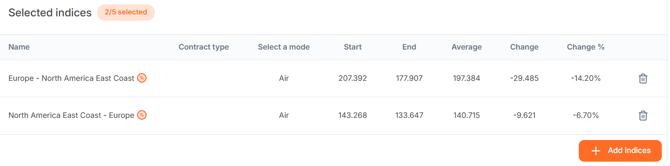
After selecting the indices, the table under 'Date Range' will populate.
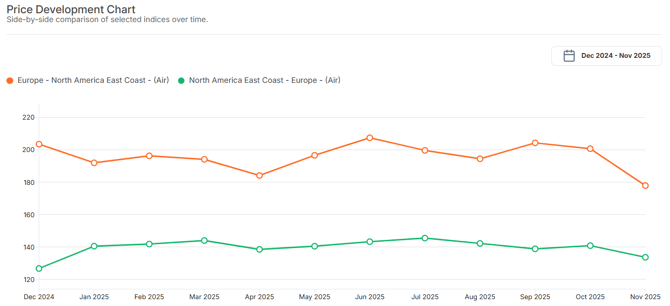
After selecting the indices, the line graph below the table will populate.
After selecting the indices, the table under 'Date Range' will populate.
- Name: The chosen transport route
- Contract type: Contract- or spot prices
- Select a mode: Chosen freight mode (Air, Sea, Road)
- Start: The initial value of the index at the chosen starting point
- End: The final value of the index at the chosen end point
- Average: The average value over the selected period
- Change: The absolute difference in value between the start and end points
- Change in %: The percentage difference between the start and end points
These values are also displayed in a line graph, clearly showing the developments of the
selected indices.
After selecting the indices, the line graph below the table will populate.
- Y-axis: displays the index value expressed as a percentage
- X-axis: shows the time period between your chosen start and end points
When the cursor moves over a specific point on the line graph, the value of the selected index or indices for that time period is displayed.