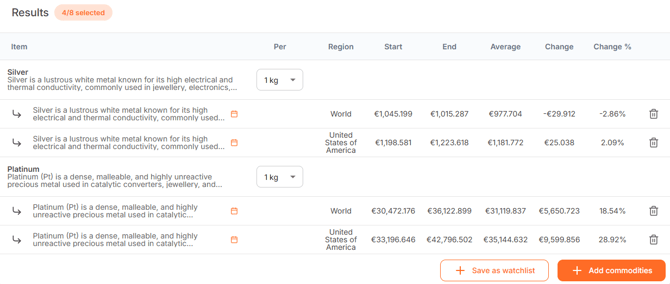
The selected commodities and currencies are displayed in a table named 'Results'. The table contains several columns with the following information:
- Item: The name of the selected commodity or currency.
- Per: Here you can adjust the weight unit of one or more raw materials
- Region: The region or country the commodity represents.
- Start: The absolute value of the price of the commodity or currency on your chosen start date, displayed in your chosen currency.
- End: The absolute value of the price of the commodity or currency on your chosen end date, shown in your chosen currency
- Average: The average commodity price over your selected period. The average commodity price is displayed in absolute value.
- Change: WTP calculates the difference between commodity prices on your chosen start and end date. The difference in this column is displayed as an absolute value.
- Change %: The percentage difference between commodity prices on your chosen start and end date is calculated here.
- Delete: Here you can easily remove one or more commodities/currencies from the chart.
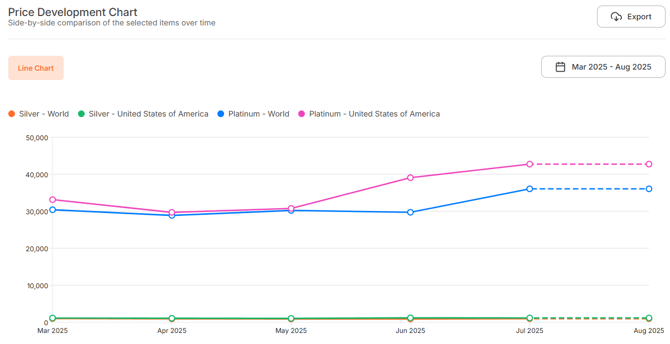
Graph result
If you have added commodities to the table, the chart distribution in step 3 'Price development chart' looks as follows:
- X-axis (left) shows the commodity price expressed in your chosen currency, representing the price of your chosen size and weight unit.
- Y-axis shows the time period between your chosen start and end date