
This new functionality allows you to create a custom cost profile.
A custom cost profile will exists from the same 16 cost components as the standard Industry Cost Profiles. However, you are now able to adjust the allocation of percentages. This allows you to create a custom Industry Cost Profile, based on the information you have or receive from a supplier.
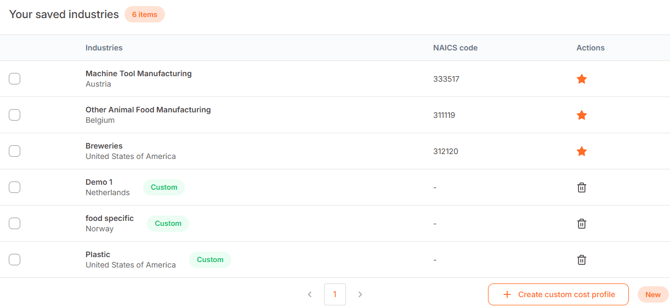
You can create a custom cost profile in the section 'Cost Profiles', under 'Industry Cost Profiles'.
Below the table 'Your saved industries', you see the button '+ Create custom cost profile'.
There, you can create your own industry, which is applicable for one specific region and year. After you created an industry and selected the region and year, the cost components will appear. You are then able to fill in all percentages per cost element. To do so, you can click open all components, such as direct labour shown in the screenshot below. (Please note: The total must sum to a 100% before it can be created).
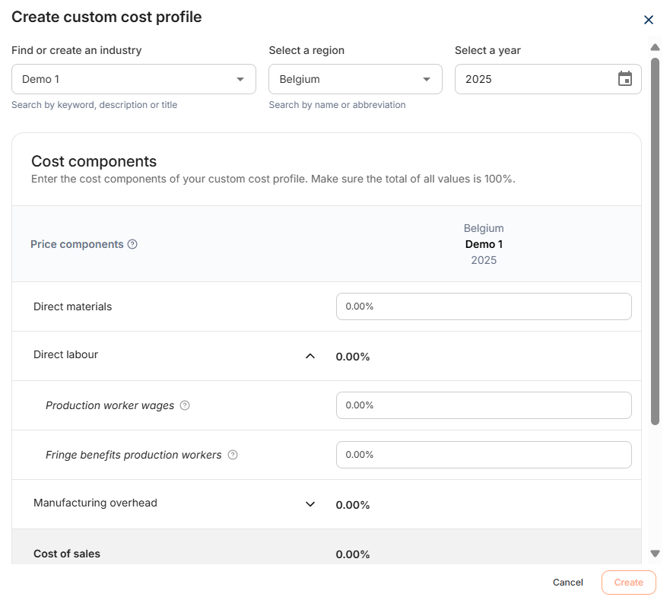
After selecting the preferred settings and entering the percentages, click on 'Create'.
It will be saved under 'Your saved industries'.