
The 'Market Report' can be used to create an easy overview of all currency and commodity
price developments. It is possible to create a report and then save it as a pre-set. This
enables everyone in your own organisation to save the 'Market Report' with some
regularity.
Creating a 'Market Report' is possible under the 'Reports' button in the menu bar. Then
choose 'Market Report'.
After selecting the desired currencies and commodities, which is explained in detail in the
paragraphs below, the market report is a very clear and convenient summarized document
to use in a supplier discussion and/or internal discussions. The Pdf provides a summary of
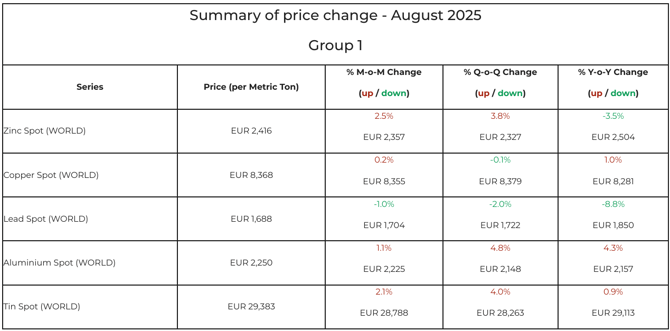
the selected currencies and commodities for each 'group'. This summary shows the price per tonne in the desired currency (Price (per tonne)). Subsequently, the percentage difference per currency and commodity is also shown from month to month (% M-o-M Change), quarter to quarter (% Q-o-Q Change) and year to year (% Y-o-Y Change).
A decrease in currency and commodity prices is marked with a green colour and an increase with a red colour. The image below shows an example of a summary page.
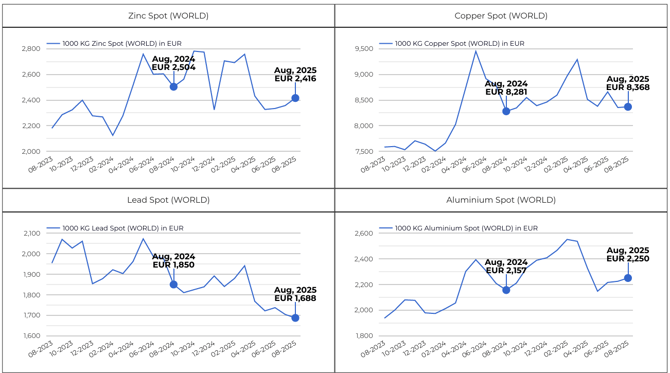
Besides a tabular summary, a chart per currency/commodity will also be displayed. It is
possible to combine several commodities in one chart, for more information click here. (link)
The chart of the currency and/or commodity in question shows the development over the
number of months selected in the set-up. In addition, you will find two indicator points (year
to year).
If you want to know more on how to create a Market report, please review 'How do I create a 'Market Report?'