
Market Report Templates allow you to group frequently used resources into reusable reports. To manage your Market Report Templates, navigate to 'Insights' > 'Market reports'.
The Market Report Templates page allows you to create and manage Market Report Templates. Use a template to generate Market Reports based on your selected resources. This page also shows the existing Market Report Templates. Click the Pencil icon to edit a template, click the Trash Bin icon to delete a template.
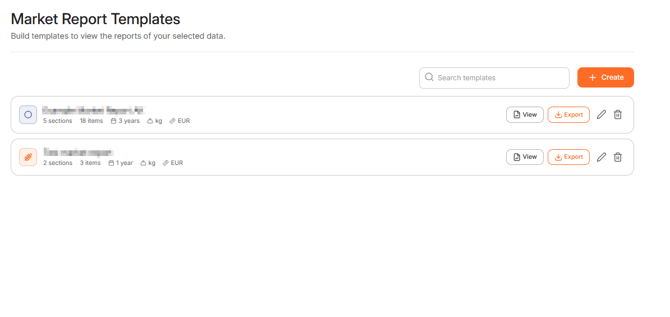
To create a new Market Report Template click '+Create'.
Select the required Date range, Currency and Unit of Measure. Enter a template name. To add resources to a section of the template, click '+Add resources'. The pop-up window allows you to select the required resources. Select the checkbox next to each required resource and pick the required region(s). Click '+Add resources' to confirm the selection.
To create a new section, click '+Add section'. Click the Pencil icon to edit the name of a section, click the Trash bin icon to delete the section.
Drag and drop sections and resources to change their order. To add a note that will appear in the market report, click 'Add note' and enter your remarks.
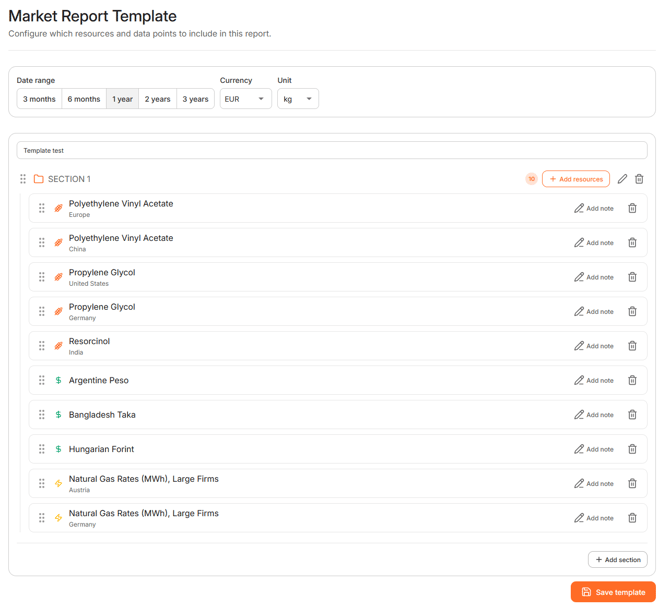
After adding the required sections and resources, click ´Save template´. Your template will be added to the database and is ready to use.
To generate and view a Market Report, click ´View´in the corresponding row. You can also export the Market Report by clicking ´Export´.